
- 20/05/2026
- Clairevision Eye Hospital
- 0 Comments
- Blogs
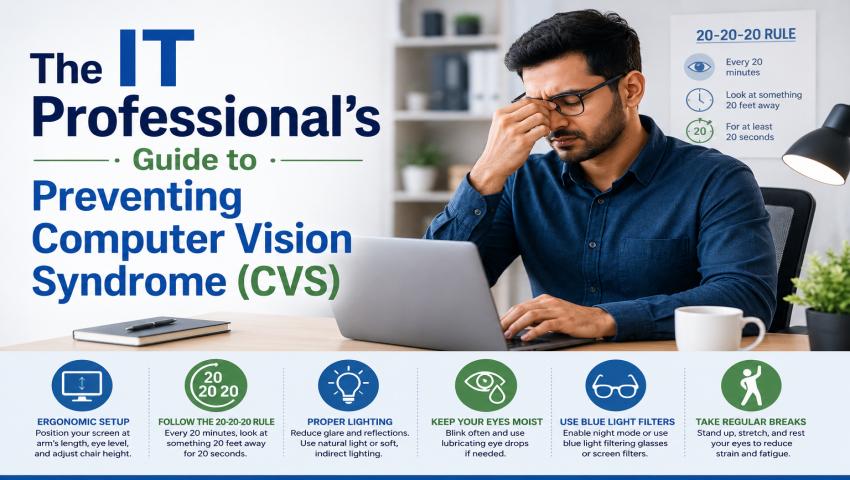
The IT Professional’s Guide to Preventing Computer Vision Syndrome (CVS)
In today’s fast-paced corporate world, IT professionals, software engineers, and digital creators spend a massive portion of their day staring at screens. Whether you are debugging code, managing cloud infrastructure, or analyzing data, your eyes are constantly working overtime due to prolonged screen use.
While your productivity might be scaling up, your eye health could be taking a serious hit. Excessive screen time and poor workstation habits are the leading causes of eye strain in tech professionals today. If you frequently experience dry eyes, blurry vision, headaches, or neck pain after a long shift, you aren’t just tired — you might be experiencing Computer Vision Syndrome (CVS), also known as digital eye strain.
Here is a comprehensive, practical guide tailored for IT professionals to protect their vision, optimize their workstations, and keep their eyes running smoothly — brought to you by Clairevision Eye Care, a trusted eye hospital in Pune.
What is Computer Vision Syndrome (CVS)?
Computer Vision Syndrome, also known as Digital Eye Strain, is a group of eye and vision-related problems that result from prolonged computer, tablet, e-reader, and smartphone use.
Unlike reading a printed page, reading text on a digital screen forces your eyes to work harder. Screens have pixels, glare, and varying contrast levels that require constant focusing adjustment. Furthermore, when focusing deeply on code or design, our blink rate drops drastically—by up to 50%—leading to rapid moisture evaporation and severe dryness
Actionable Strategies to Prevent CVS on the Job:
1. Upgrade Beyond the 20-20-20 Rule:
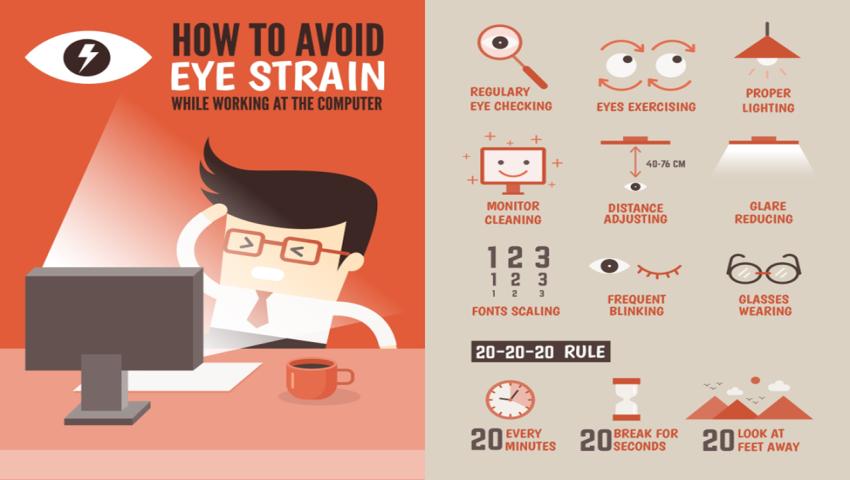
Most professionals know the classic 20-20-20 rule: Every 20 minutes, look at something 20 feet away for 20 seconds. However, for heavy screen users, adding a “Blink Break” is crucial. Every time you take that 20-second break, consciously blink completely 10 times. This pumps the Meibomian glands in your eyelids, releasing the natural oils needed to seal moisture into your eyes and prevent the burning sensation of dry eyes.
2. Optimize Your Desk Ergonomics:
Your workstation setup plays a massive role in how hard your eyes have to work.
- The Angle: Position your monitor so that the top of the screen is at or slightly below eye level. Your eyes should look slightly downward (about 15 to 20 degrees) at the center of the screen. This minimizes the exposed surface area of your eyes, reducing dryness.
- The Distance: The screen should be about 20 to 28 inches (50 to 70 cm) away from your face—roughly an arm’s length.
- Font Scaling: Stop squinting at tiny code lines. Increase your IDE and browser font sizes, and utilize high-contrast dark or light themes depending on your ambient room lighting.
3. Tackle Ambient Lighting and Glare:
Bright overhead fluorescent lights or sunlight streaming directly onto your monitor creates severe glare, forcing your eye muscles to strain to read the text underneath.
- Position your monitor away from direct windows or use blinds.
- Consider using an anti-glare screen filter.
- Avoid working in a pitch-black room with a glowing screen; ensure the ambient lighting matches the brightness of your monitor.
4. Stay Hydrated and Mind the AC:
Corporate offices and server rooms are heavily air-conditioned, which strips moisture from the air. Direct airflow from AC vents can dry your eyes out even faster. Position your desk away from direct air drafts, stay hydrated throughout the day, and consider keeping a small desktop humidifier nearby.
The Truth About Blue Light Glasses: Do They Really Work?
Blue light glasses have become incredibly popular in IT hubs. While they can help soften the harsh contrast of a screen and sometimes improve sleep quality by blocking blue light before bedtime, they are not a cure-all for eye strain.
Most digital eye strain is caused by poor ergonomics, lack of blinking, uncorrected prescription errors, and glare—not just blue light. Relying solely on these glasses without fixing your workstation habits or getting your eyes checked won’t solve chronic discomfort.
When Should an IT Professional See an Eye Doctor?
While most CVS symptoms improve with rest and lifestyle changes, you should visit an eye specialist if you experience:
- Eye strain or headaches that persist even after taking regular breaks
- Blurred vision that does not clear up after resting
- Severe dry eyes that worsen throughout the day
- Difficulty focusing when switching between screen and distance
These could indicate an uncorrected prescription error. Whether you need updated glasses or contact lenses, visiting our contact lens clinic in Pune ensures you get the right prescription for comfortable screen use every day.
Prioritize Your Vision with Clairevision Eye Care:
Your eyes are your most valuable professional asset. While lifestyle modifications and ergonomic adjustments form the foundation of defense against digital strain, they cannot replace specialized medical care. If you experience persistent eye fatigue, blurry vision, or chronic dryness, it is time for a professional assessment.
At Clairevision Eye Care, we specialize in comprehensive eye health solutions tailored to the needs of modern working professionals. From advanced dry eye therapies that restore natural lubrication to precise vision testing for specialized computer lenses, our expert ophthalmologists ensure your eyes stay protected in a digital world.
Don’t let eye strain slow your career down. Book an Appointment at Clairevision Eye Care — because your vision is worth protecting.
Frequently Asked Questions:
The three most effective ways to prevent CVS are following the 20-20-20 rule, setting up your workstation ergonomically with the monitor at arm’s length, and getting a regular eye check-up at Clairevision Eye Hospital to catch any uncorrected vision problems early.
Yes, CVS can be fully reversed in most cases. Since it’s caused by prolonged screen use and not permanent damage, symptoms improve with rest, screen breaks, and proper treatment. Visit Clairevision Eye Hospital for a personalized eye care plan to recover faster.
Every 20 minutes, look at something 20 feet away for 20 seconds. This relaxes your eye muscles and is the simplest and most effective habit to reduce digital eye strain, especially for IT professionals on screens all day.
No, CVS is not permanent. It is a reversible condition in most cases. However, if symptoms like dry eyes or blurred vision persist despite taking breaks, visit Clairevision Eye Hospital, Wakad, Pune for a comprehensive eye examination before it becomes harder to manage.